Serving Markdown Documents using a Simple Local Server
Recently I've been stumbling across many markdown documents, a format similar to the simple markup languages found on most Wikis that has become more popular at least in part because of github's use of markdown for creating documentation.
The goal of the Markdown syntax (according to John Gruber, its creator) is:
to make it as readable as possible. The idea is that a Markdown-formatted document should be publishable as-is, as plain text, without looking like it’s been marked up with tags or formatting instructions
Like most Wiki markup languages, the idea is to allow the user a means of a simple syntax which they can use to denote semantic and presentational features such as heading, emphasis etc.
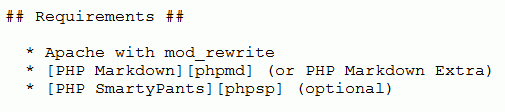
For example, according to the Markdown rule, the following syntax:
should translate to the following HTML:
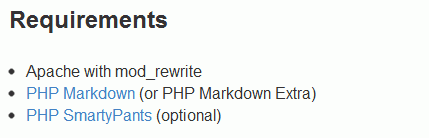
In this case, we've specified a heading followed by a bulleted list that contains some hyperlinks.
OK, great. But how do I see the results?
Being able to create markdown documents is, of course, pretty straight-forward; you just need a plain-text editor and a cursory knowledge of the Markdown syntax.However, once you've created a Markdown document (or stumble across someone else's Markdown document when you're looking over, say, some code that you've downloaded), how do you view it in the browser in the final HTML form?
There are Markdown parsers, notably the Perl parser written by John Gruber, the Markdown creator, as well as a good PHP parser written by Michel Fortin. Both of these can be integrated with a standard Apache web server relatively easily in order to server markdown pages.
However, the idea of creating a virtualhost directory in WAMP / MAMP / XAMPP and then copying any Markdown documents into that directory in order to see these doesn't really sound that elegant – surely there has to be a better / easier way to see the HTML of a Markdown document?
An easy solution
Given that recent builds of scripting languages such as Python and PHP (5.4+) include a web server, this seemed to be the obvious route – I chose to go the PHP route.1. Download Rob McBroom's php markdown script
This is a PHP script that will pre-process a Markdown document, applying settings as defined in the accompanying .ini file, such as generating a table of contents based on the headings in the document.NOTE: I did have to make some minor changes to this script, largely adding isset() checks around a handful of variables that appeared in if statements but hadn't been previously defined.
mkdir /scripts
cd /scripts
git clone git://github.com/skurfer/RenderMarkdown.git markdown
chmod ug+x markdown/*.php
2. Download Michel Fortin's PHP Markdown library
pear channel-discover pear.michelf.ca
pear install michelf/Markdown
3. Add the include_path to the php.ini
sudo vim /usr/local/php5/lib/php.ini
include_path=".:/usr/local/php5/lib/php:/scripts/markdown"
4. Create a shell script, markdown.server, that we can use to kickoff the PHP web server
cd /scripts/markdown
sudo vim markdown.server
#!/bin/bash
php -S localhost:8000 render.php
chmod ug+x markdown.server
5. Add the location of our script to our PATH
sudo vim ~/.bash_profile
export PATH=/usr/local/php5/bin:$PATH:/scripts/markdown
. ~/.bash_profile
6. At a console, cd into any directory that contains a markdown file and run the shell script
cd c:/scripts/epub_tools markdown.server
If all goes well, you should see something like the following:
PHP 5.4.6 Development Server started at Fri Aug 31 10:59:26 2012
Listening on http://localhost:8000
Document root is /scripts/markdown
Press Ctrl-C to quit.
And then be able to navigate in your browser to a Markdown document. Assuming that we've got a README.md document in the directory where we started the webserver, we can simply use http://localhost:8000/README.md
Markdown, here I come!
So, with an easy way of seeing any Markdown document, either one that I've created, or someone else's that's appeared somewhere on my system (e.g. because I've cloned someone's repository from github), I feel a lot more willing to create Markdown documentation.I've lived with Wikis for a while now, including the handy solution of TiddlyWiki + Dropbox for keeping a personal notebook that will remain automatically synchronised across the different computers in my life (at home and work) and that will also be usable when I'm offline.
However, Wikis typically require that the documents live in a central repository somewhere, even if this is a Dropbox folder.
With the above solution, I'm now happy to create Markdown documentation that lives with the particular project code whereever it may reside on my local machine, knowing that I can easily view it (or anyone else's Markdown documentation) as HTML.